What the European Accessibility Act Means for Your Website, Reports and Decks



That elegant pale-grey text your designer loves? On a lot of European websites, it could now break the law.
The European Accessibility Act (EAA) started to apply across the EU in June 2025, and it's the first EU-wide law telling private companies, not just governments, that their digital products and services have to work for people with disabilities. It arrived with the usual fanfare: a wave of panic, a wave of vendors selling audits, and a lot of associations and companies wondering whether any of it applies to them at all.
The short, honest version: whether the law strictly binds you depends on what you sell and how big you are, and we'll get to that in a bit. But a large part of what it asks for was never a job for your developer in the first place. It's design and content. Type people can read. Colours with enough contrast. Images that are described. Video that's captioned. Reports and slide decks built so a screen reader can get through them. That half is yours, and you can start on it today without touching a line of code. The technical side, screen readers, keyboard navigation, the machinery under the bonnet, belongs to a developer, and we'll be clear about where that line falls.
This article is about your half.
Does the European Accessibility Act actually apply to you?
Probably, if you sell to consumers in the EU through a screen. That's the rough test, though the law only applies to a defined list of products and services.
The defined list of consumer products and services is online shops, e-books, banking, phones and computers, ticket machines, e-readers, and the digital services around passenger transport, among others. If you run e-commerce, and selling event tickets or publications online counts, you're very likely in. It also reaches beyond the EU's borders. Where your office is located doesn't matter; whether your customers are in the EU does. A studio in London or a firm in New York selling to EU consumers is on the hook the same as one in Brussels.
Two things narrow it down.
First, size. If you provide services with fewer than 10 people and under €2 million in turnover or balance sheet total, the service side of the law doesn't apply to you for now. Both halves have to be true, and the money test is turnover or balance sheet, whichever is higher. An association sitting on decent reserves can pass comfortably on headcount and still fail on the balance sheet. That's a real exemption, and it's worth looking at before you panic-buy an audit. In Belgium that runs until June 2030, then it stops. A lot of Brussels secretariats are sitting in that window without realising it has an end date.
Second (and this is the part the vendors gloss over): most of what an association does isn’t on the list. The EAA covers specific services, e-commerce, e-books, banking, telecoms, transport. Representing members, lobbying, running a members' area, publishing policy positions aren’t on the list. The moment you sell something to individuals though (a report, an event ticket, or an online course), that part is in scope like anyone else's shop.
So here's the honest read for our two audiences:
- Expert-led firms and brands selling to EU consumers: assume it applies. Your website, your client portal, your checkout, your booking flow. If people can buy from you or transact with you online, it needs to work for everyone.
- Associations: parts of you are in, parts are out, and the small ones may be exempt on services entirely. But plenty of your members will be in scope, depending on your sector, which turns out to be interesting. More on that near the end of the article.
For the record, the technical standard behind all this is EN 301 549, which for websites and apps points to WCAG 2.1 at level AA (an updated version of EN 301 549 incorporating WCAG 2.2 is expected to be formally cited around late 2026, so if you're building something new, build to 2.2).
You don't need to memorise that. You do need to know the deadlines, and this is where most of the advice online is wrong.
In-scope websites and apps had to comply from 28 June 2025. Full stop, no grace period. The 2030 date you'll see quoted everywhere is narrower than it looks: it covers pre-existing service contracts and physical kit already in use, not live websites.
There is one genuinely useful exclusion. Content published before 28 June 2025 and not updated since is out of scope. Old PDFs, old video, archived pages. Which means your back catalogue of annual reports is fine. The next one isn't.
One thing worth knowing: because the EAA is an EU directive, each country writes its own version. The exact fine levels, the enforcement, and the precise format of an accessibility statement all live in national law. Aim for the standard, though, and you'll be in the right place for all of them.
The half that was never a developer's job
Accessibility gets filed under "technical," which is how it ends up stuck in a developer's backlog, nowhere near the people who actually created the problem.
Most accessibility failures are design and editorial decisions made long before anything got built. The pale-grey-on-white palette was a brand choice. The thin, elegant body font was a brand choice. The chart that uses red and green to tell two lines apart was a design choice. The image with no description, the video with no captions, the PDF exported straight from InDesign with no thought to how it reads aloud, all editorial and design calls. No developer introduced any of that, and no developer can fully fix it, because the fix is a different colour, a different font, a redrawn chart, better words.
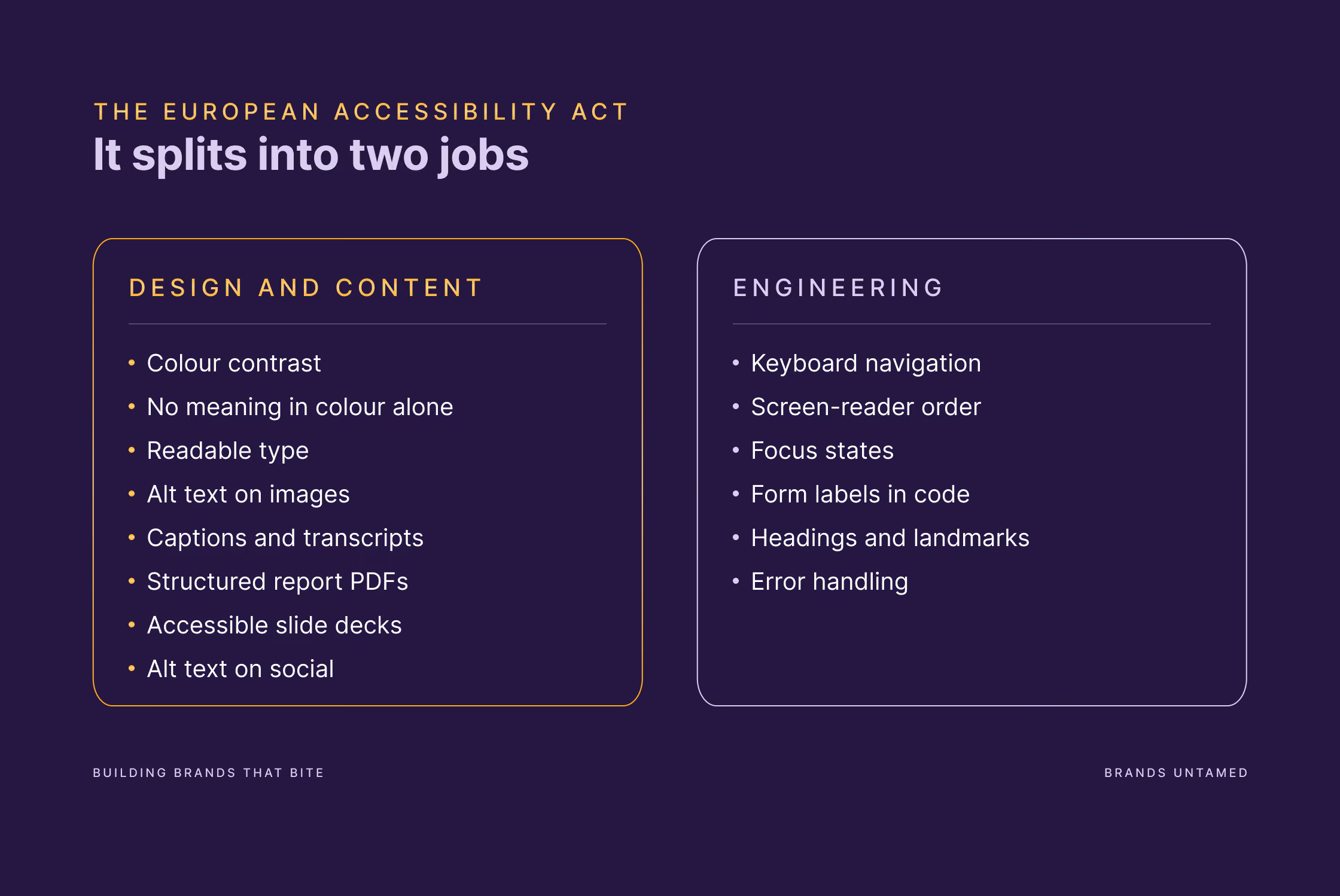
This is where the work splits cleanly, and knowing the split is most of the battle. The colour, type, imagery, documents and copy are a brand and content discipline. The code underneath is an engineering discipline. Serious accessibility needs both, working together, the way a good building needs both an architect and a structural engineer. Nobody thinks less of the architect for not pouring the concrete.
We handle the first discipline. For the second, you'll want a developer, whether that's yours, ours, or one we bring in together.
What you can fix yourself
None of the below needs a developer. Most of it needs some time and a bit of discipline.
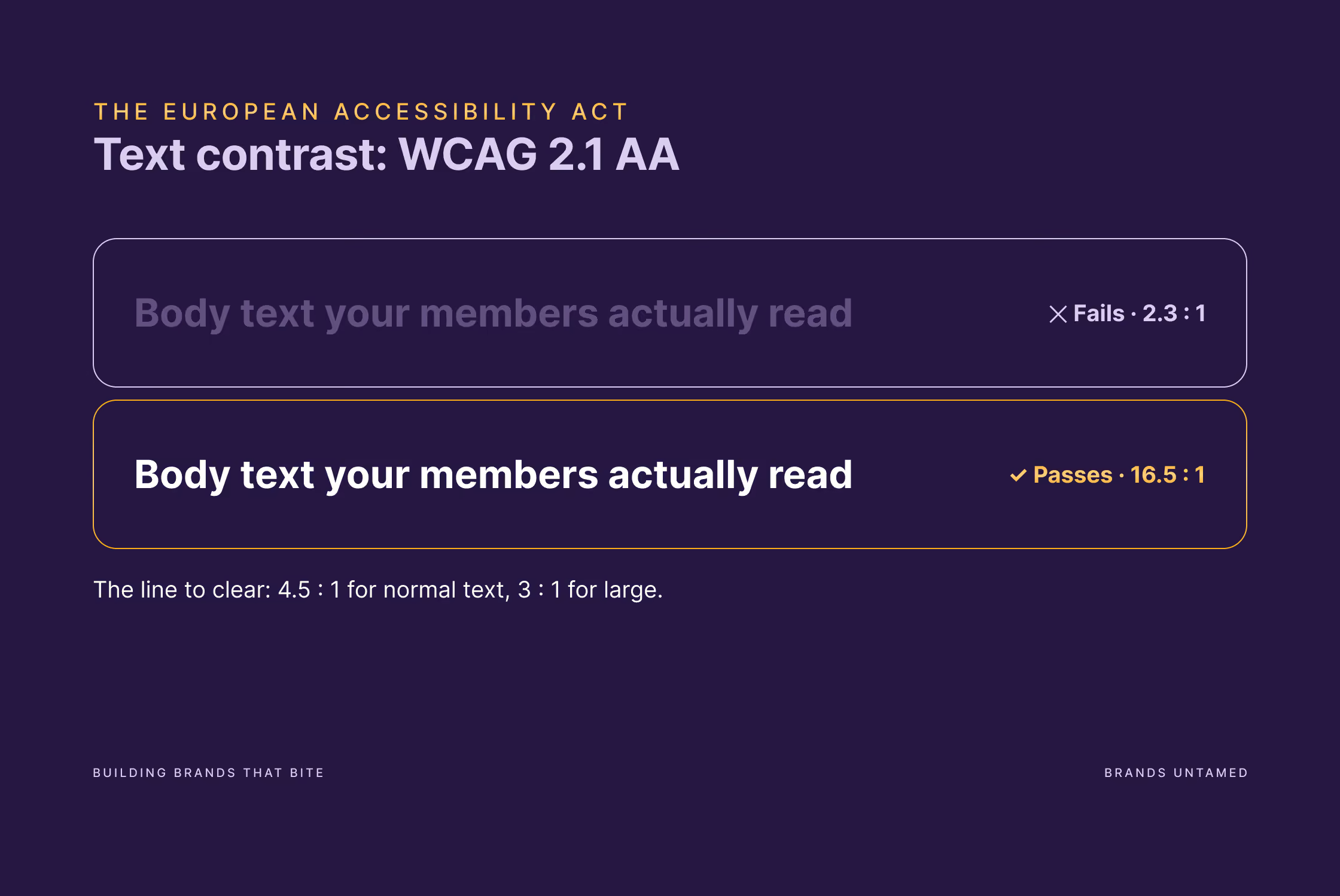
- Fix your contrast. The rule is a contrast ratio of at least 4.5 to 1 for normal text, and 3 to 1 for large text. Pale grey on white almost never passes. Run your palette through a free contrast checker, and if your brand colours fail on white, define accessible pairings now so nobody has to improvise later. If you're rethinking your colours anyway, our guide to picking a brand colour palette is a good place to begin.
- Stop using colour on its own to carry meaning. A chart that separates two lines by red and green alone disappears for anyone colour-blind. Add a label, a pattern, a direct annotation. Same goes for links that are only marked out by being a slightly different colour: underline them.
- Make type readable. Reasonable sizes, real line spacing, and body copy that isn't set in a hairline weight because it looked refined in the mockup. Our typography guide covers a system that survives Word, Canva and everything in between, which is exactly where accessibility tends to slip.
- Describe your images. Every meaningful image needs alt text: a short, plain description of what it shows and why it's there. Purely decorative flourishes can be marked to be skipped. This is a writing job, not a coding one.
- Caption your video. Subtitles on everything, and a transcript for anything longer. It helps deaf and hard-of-hearing viewers, and everyone watching on mute, which is most people, most of the time.
- Fix your PDFs. This one's big for associations. An annual report exported without structure is a wall of text to a screen reader: no headings to navigate by, no reading order, tables that turn to soup. Built properly, with real heading styles, alt text on charts and a logical reading order, the same report becomes navigable. We get into what separates a readable report from an unreadable one here.
- Fix your decks. Slides carry the same issues: unlabelled images, colour-coded charts, text jammed at low contrast over a busy background. The habits that make a deck look authored rather than generated mostly make it more accessible too.
- Mind your social. Alt text on posts, captions on video, and try not to bury important information inside an image with no text alternative.
That's the bulk of it, and none of it is exotic. It's a craft, applied with one more constraint in mind.
Where the developer takes over
The rest is genuinely technical, and pretending otherwise would be doing you a disservice.
Your developer's territory is the machinery: making the site work by keyboard alone, so someone who can't use a mouse can still get through it; making sure a screen reader announces things in a sensible order; labelling form fields in code so they're usable; getting focus states, headings and landmarks right in the markup; handling error messages properly.
The trick is briefing it well. A developer handed a "make the site accessible" brief will struggle. A developer handed a clear scope, the standard to hit (WCAG 2.1 AA), and a design-and-content layer that's already sound will get somewhere. If you've never briefed technical work like this, our guide to briefing an external team without wasting everyone's time applies directly.
The accessibility statement
If you're in scope, you need an accessibility statement: a page that says how your service meets the requirements, where it falls short, and how someone can flag a problem or get help. It's part content, part legal, and it's public.
The temptation is to make it sound better than it is. Don't. The law, and every enforcement body reading it, expects honesty and demonstrable progress. A statement that admits two known issues and a fix timeline is stronger, and safer, than one that claims full compliance it can't stand behind. Write it plainly, keep it current, and treat it as a live document.
For associations: this is a chance to lead, not just comply
Here's the part that makes this more interesting for associations than for almost anyone else.
You might be largely exempt. Plenty of your members won't be, and it depends on your sector: represent retailers, banks, publishers, travel or telecoms and a lot of them are squarely in scope, working it out right now.
And there's a second route that catches almost everyone: if your members bid for EU contracts or run EU-funded projects, accessibility requirements arrive through the paperwork whether the EAA applies to them or not.
That puts you in an unusually strong position: get your own house in order first, your reports, your event materials, your site, then help your sector do the same. A briefing note, a session at the annual conference, a shared checklist, a set of accessible templates members can use as is without redesigning it (and spending more time and budget of their own) to make it compliant. That's the kind of practical value that makes membership feel worth the fee, and it's a subject you can own before the consultancies start charging for it.
There's a value angle too, and for once it isn't window-dressing. Plenty of associations already talk about inclusion and representation. Accessible communication is that principle applied to your own output. Almost a quarter of adults in the EU, on Eurostat's figures, report some form of disability. Build your annual report so all of them can read it, and you've done the thing you already say you believe in, rather than just saying it.
FAQ
Does the European Accessibility Act apply to my association?
Partly, and it depends on what you sell. Advocacy, policy work and member representation aren't on the EAA's list of covered services, so most of what an association does day to day sits outside it. Anything you sell to individuals online is a different matter: publications, e-books, event tickets, courses, a membership renewal with a payment page. That's e-commerce, and it's in scope. If you're under 10 staff and under €2 million in turnover or balance sheet total, the service requirements don't apply to you yet, and in Belgium "yet" means until June 2030. Your members are a separate question, and depending on your sector, a more interesting one.
Does it apply to my company if we're based outside the EU?
Yes, if you sell covered products or services to consumers in the EU. The law follows the customer, not the company's address.
What's the deadline?
It's passed. In-scope websites and apps had to comply from 28 June 2025, with no grace period. The 2030 date that gets quoted everywhere covers pre-existing service contracts and physical kit, not live digital services. The one useful exception: content published before 28 June 2025 and untouched since is out of scope, so your archive is fine and your next report isn't.
We're a small team. Are we really exempt?
On services, yes, if you're under 10 people and under €2 million in turnover or balance sheet total. Two things to keep in mind, however. In Belgium that exemption ends on 28 June 2030. Belgium chose to time-limit it and most member states didn't, so check your own country. And it only covers services: if you manufacture or sell a covered product, the exemption doesn't apply to you. Beyond that, "exempt" and "worth doing" aren't the same thing. The design and content fixes are cheap, they widen your audience, and they're the right call whether or not a regulator is ever watching.
Do we need an accessibility statement?
If you're in scope, yes. It should describe how you meet the requirements, note where you don't yet, and give people a way to report problems. Honesty beats bravado here.
Does this mean rebuilding our website?
Usually not. Most of what trips organisations up is fixable without a rebuild: contrast, type, alt text, captions, document structure. The deeper technical work can often be done in place by a developer. A full rebuild is a decision about your website, not a requirement of this law.
Can accessible design still look good and stay on-brand?
Yes, and anyone telling you otherwise is hiding behind the rules. Accessibility asks for a floor: enough contrast, readable type, no meaning carried by colour alone. It's a constraint, and good design has always worked within constraints.
What are the penalties?
That depends on the country, because each member state enforces its own version. Consequences range from a formal complaint or a cease-and-desist through to fines and, in the worst case, a service being pulled from the market. So far, regulators have leaned towards asking for a credible plan and visible progress rather than issuing instant fines. But regulators aren't the only route. In June 2026 a French court ordered Carrefour to make its online services accessible within six months, with daily fines for every day it runs over, in a case brought by disability organisations rather than an enforcement body. You don't need an inspector to turn up for this to become a problem.
What about our annual report PDF?
It's one of the most common failure points, and one of the most fixable. A report built with proper heading styles, described charts and a logical reading order is navigable by a screen reader. One exported flat, with everything visual-only, isn't. The difference is in how it's made, not how it looks.
If this sounded like your last annual report
If your reports, decks, website and identity need to be both compliant and genuinely good, that's the half of accessibility we work in, the design and the content, alongside your developers for the engineering. And if you're an association wondering how to turn this from a chore into something your members actually thank you for, that's a conversation worth having.
Get in touch and let's make your next report one everybody can read.